Plugin features
Plugins add tools, menus, or workflows to Serpent. They are not ordinary library assets and can be enabled or disabled at any time.
Install a plugin
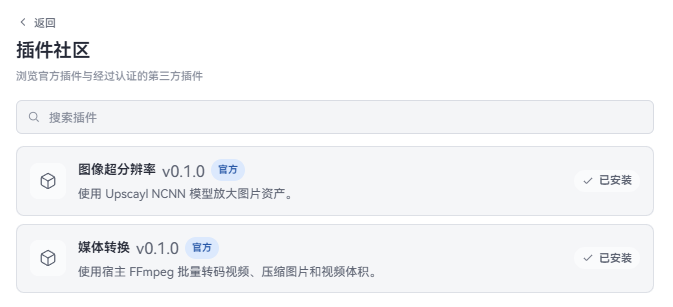
Official plugins and verified third-party community plugins can be installed in one click from the built-in Plugin Community:
- Official plugins: Developed and maintained directly by the Serpent team, identified with an official badge.
- Verified plugins: Built by open-source community developers, audited for security and usability by the Serpent team, and included in the official catalog.
- Open Settings → Plugins and choose Browse community.
- Browse or search. Click a card to see the author, version, repository, permission declarations, and readme; click Install and choose User-wide or This library.
- After installation, return to the plugin list. Restricted plugins can be enabled immediately; unrestricted plugins require confirming trust before their first run.
A user-wide plugin is available across all libraries on your machine; a library plugin is active only in the current library.
If you have local files or a direct GitHub repository address provided by an author, use Advanced install:
-
In Settings → Plugins, choose Advanced install.
-
Choose Install ZIP or Install folder, or paste a GitHub repository / Release URL. For example:
- Batch renamer plugin:
https://github.com/dolag233/Serpent-Plugin-Renamer - Media converter plugin:
https://github.com/dolag233/Serpent-Plugin-MediaConverter - Image upscaler plugin:
https://github.com/dolag233/Serpent-Plugin-ImageUpscaler
- Batch renamer plugin:
-
Choose User-wide or This library.
If you are a plugin author and want your plugin included in the official community catalog for all users, see the Plugin Distribution and Certification Guide.
The plugin appears in the plugin list after installation. Follow the plugin author’s own instructions if it needs additional setup.
Enable and disable
- Turn on Enable on the plugin card.
- The first time you enable a library plugin, Serpent asks whether you trust it. Only approve a source you trust.
- Turn Enable off whenever you do not need the plugin.
- Click Reload after changing plugin settings; Serpent does not need to restart.
If the same plugin is installed both user-wide and in the library, the plugin list shows which version is active and lets you switch or disable it.
Update and uninstall
GitHub plugins can check for updates from plugin settings. Automatic updates are off by default; confirm the source before enabling them. Plugins installed from the community do not follow the latest GitHub Release by themselves; update them from the community page after the directory lists a new version.
Uninstalling a plugin does not remove personal settings it may have saved. Reinstall it later if you want to keep those settings; if the plugin provides its own cleanup action, prefer that action.
If a plugin does not work
Check that it was installed in the intended scope, then reopen plugin settings. If it still does not work, contact the plugin author with your Serpent version, operating system, and plugin name. Never include an API key or other private data in a report.
Developers should read the plugin developer manual.